



On Aug, 26, I was publishing blog posts for my SaaS platform for 3 months straight.
I kept on checking Analytics and Ahrefs day in and day out. But sadly, neither the clicks nor the Average position of my articles improved.
I initially wondered whether the problem was in my content. But it turns out Google couldn't understand what my pages were actually trying to cover.
Once I detected the real problem, it just took me 10 minutes to fix. Guess what, it cost me 0 cents too. What was the fix? Meta data seo.
Have you also wondered why thinner content than yours ranked just like that while yours didn’t?
That magic is in meta data seo. Let’s discover what is seo meta data and why it matters. On that note, these are the points I have covered in this article:
- What is meta data SEO
- How Google uses it
- How content writers can use it
- Why meta data SEO matters for search rankings
- How meta data improves CTR
- What happens when meta data is wrong, misleading, or missing
- 5 most essential meta tags
- How to improve meta title and meta description
- Quick reference checklist for better meta data seo
What Is Meta Data SEO?
Meta data is an on-page SEO practice that helps Google understand what your content is about and the main USP of the article you have written.
It tags and labels your content, establishing a hierarchical structure to standardize its attributes. For readers, it shapes the context of the information contained in your article.
To clarify, the term “meta” means something that is self-referential. So, in simpler terms, meta data is the data explaining the most important “data” in your article/content.
But what does meta data tell readers?
Readers can read your article’s meta data to understand the objective, purpose, and keyword placement of the content.
But meta data seo practice also helps the search crawler to understand the same elements so that your content becomes more visible to readers to whom the content matters.
What Are The Main Elements In Meta Data
There are 2 elements that comprise the meta data of content:
- The Page Title, which we also call “meta title” in SEO terms
- The brief description of the page content, a.k.a “meta description”
**Purpose of Meta Title: Explaining to the search engine what your content is EXACTLY about.
**Purpose of Meta Description: Describing the content and their purpose in details
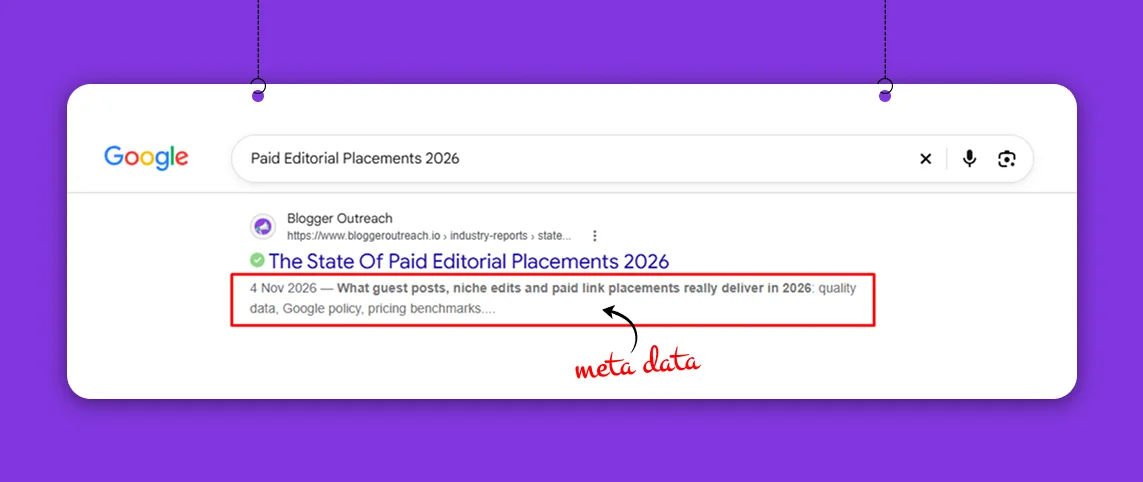
Take This Example from a Bloggeroutreach article:
This screenshot from Google Search shows the meta description in the red-outlined container.
Also, the page title on the Blogger Outreach website is “State Of Paid Editorial Placements, 2026”. Whereas the seo meta title is The State Of Paid Editorial Placements 2026.
We make a meta title based on the primary keyword that users could actually be searching for. Take a look at the meta description too. It describes exactly what the content conveys, adding a few hooks and details to encourage readers to click through.
Are There Different Types Of Meta Data?
Yes, there are different types of Meta Data SEO practices. Different types of metadata describe format differences between image files like .PNG, .JPEG, and others.
Another kind of metadata can contain author names and content edit timestamps. This type is usually used for text files and documents.
How Search Engines Actually Use Metadata?
Search engines parse metadata to index content more accurately. Metadata also lets readers preview content in search results.
That helps ensure the search query and the search results align.
Why Metadata Is Helpful For SEO?
In SEO, meta titles can directly help your content to rank higher. But how?
Simply put, when you place the keyword in your meta title (organically). Google serves it to users who search for that keyword.
However, the meta description is not a direct ranking factor. In fact, a good meta description can help you to improve your content’s click-through rate.
Niche readers get supporting context from the meta description, which prompts them to click the article for more details.
The search engine uses bots to crawl the page content, including the seo metadata. The crawl results are used to decide the ranking of your content in the results section.
What Will Happen If You Use Wrong Or Misleading Meta Data?
If you use wrong meta data, the search engine will not show your post for that search term. So don’t use the wrong meta title.
A misinterpreted meta description will increase your bounce rate. Why?
Users will enter your article hoping to find specific information based on the meta description you used.
When they discover the article is on a different topic, they will bounce immediately. As a result, your article’s bounce rate will also go higher.
Meta Data Essentials Every Website Should Have
What are meta tags?
Meta tags are HTML codes offering relevant information about the webpage you have published to the browser and search engines.
Users cannot see them in the published form. However, each tag directly influences the ranking of your article on Google pr any other search engine.
New website owners should immediately check for every tag on this list as soon as they get a handover of their website from the developer:
Unique Title Tag: It is usually 50 to 60 characters, with the keyword preferably at the front
Unique Meta Description: Ideally 155 characters, which is a compelling hint of what the article offers
Canonical Tag: Points all duplicate or similar pages to the version you want to rank on Google
Header Tags: Usually rangers from H1 to H6, and consists of 1 H1 and H2 to H6 for logical distribution of the subtopics
URL Slug: The extension of the URL after the domain and extension, which should be the keyword or similar, and short and in lowercase
Image Alt Text: Describe the image contents in simple terms and include the keyword in the description naturally, if possible.
Robots Meta Tag: Use a no=follow tag for pages that you dont want the search engine to crawl
Viewport Tag: Ensure your pages are seamlessly visible on mobiles, tablets, and 14-inch laptops
Schema Markup: To get higher rankings, use FAQs in the article along with Product info
Final Check: Check the preview of your article in Google Search Console or on the SERP preview tool before you hit publish.
The Most Important 5 Meta Data SEO Tags
These 5 seo meta tags give the strongest signals to Google. Let’s learn more about them:
1. Title Tag
<title>What Is Metadata? A Beginner's Guide to SEO</title>
How It Helps?
- It is the headline in search results, which is actually clickable
- It is the first clear signal that tells Google what your content mainly covers
- A direct, clear, and easily understandable title increases any content’s click through rate
Who Should Write It: Ideally, the writer who created the content should write it. After that, a CMS editor or your developer can add it to your content page using plugins like Rank Math or Yoast.
2. Meta Description
<meta name="description" content="Learn what metadata is, how it works, and why it helps your pages
How It Helps
- In search results, it is the preview text that readers can find just under your title
- It makes readers click on your article, so make it as “hookworthy” and “value driven” as possible
- If your meta description does not properly cover the original search query, Google will rewrite it to make it suitable for your content
Who Should Write It: Ideally, the writer who created the content should write it. After that, a CMS editor or your developer can add it to your content page using plugins like Rank Math or Yoast.
3. Canonical Tags
<link rel="canonical" href="https://www.example.com/what-is-metadata/">
How It Helps
If there are duplicate pages, it signals Google which ones are the main (for instance, the preferred version)
It brings all positive ranking signals to the page you actually want to rank.
Who Should Write It: Ideally, the developer or your technical SEO should write and add it through plugins.
4. Robots Meta Tag
<meta name="robots" content="noindex, nofollow">
How It Helps
- It controls whether your page can be discovered among the search results (noindex) and whether Google follows its links (nofollow)
- Best used for thank you pages, staging pages, and internal search results
- A wrong noindex can erase your page from Google permanently
Who Should Use It: The technical SEO person decides which pages need this tag. Again, the developer should implement it after consulting with the content creator.
5. Schema Markup
<script type="application/ld+json">
{
"@context": "https://schema.org",
"@type": "Article",
"headline": "What Is Metadata and Why Is It Important for SEO?",
"author": { "@type": "Person", "name": "Your Name" },
"datePublished": "2026-11-25"
}
</script>
How It Helps
It signals what type of content you have created. For example, whether it is an article, a product, an FAQ, or usually a recipe.
It helps you get more ratings against your content and get your FAQ section to appear in the AI overview. Such actions attract clicks.
Who should be involved in creating and refining this script? Ideally, a developer on the SEO team or another technical SEO person should do it.
How Beginners Can Add Metadata To A Website?
There is no single method of adding metadata to your website. It actually depends on how your website was built.
For example, we use WordPress to develop our sites. So, for us, the most common way to add metadata is through a plugin called Yoast. Plugins make it easy to add any metadata.
Adding Metadata In Wordpress With Yoast SEO
This 11-step process is your one-stop guide if you are a young developer or an SEO person in charge of adding metadata to content:
Step 1: Set Up Yoast SEO
Go to Plugins > Add New, search for "Yoast SEO," click Install Now, then Activate.
Step 2: Open Your Content Page
Go to Posts (or Pages), then open the one you want to optimize, or create a new one.
Step 3: Search The Yoast SEO Box
Scroll below the editor to the Yoast SEO section. In the block editor, you can also click the Yoast icon in the top-right sidebar.
Step 4: Decide Your Focus Keyword
Type the main keyword you want to rank for, such as "what is metadata." Yoast will use it to check your content and give optimization tips.
Step 5: Write A Suitable SEO Title
Click Edit snippet (or Search appearance). In the SEO title field, write a title under 60 characters with your keyword near the front.
Step 6: Create Your Content’s Meta Description (Google Can Also Fetch It)
In the Meta description field, write 150 to 160 characters that summarize the page and give readers a reason to click.
Step 7: Write The URL Slug
Edit the Slug field to keep the URL short, lowercase, and keyword-relevant (for example, what-is-metadata).
Step 8: See The Preview
Use the Mobile result and Desktop result toggles to see how your listing will look in Google.
Step 9: Advanced Tab Features You Should Know
Open the Advanced tab to:
- Allow or block search engines from indexing the page (robots tag).
- Set a canonical URL if the page has a duplicate version.
Step 10: If Your Site/Page Allows Social Shares
Open the Social tab to add a custom title, description, and image for Facebook and X (Twitter). These control the Open Graph and Twitter Card tags.
Step 11: Issue Fixing For SEO
Review the SEO analysis and Readability analysis for red or orange items, fix what makes sense, then click Update or Publish.
| Tip: If you want to create a default template for posting similar content, you can set it up for “Content Types” under the Settings Tab of Yoast SEO. Just create your own title and meta description. |
How Can I Improve My Meta Titles?
In many cases, “Your focus keyword: site/company name” would be a good meta title. But you can improve it further. But a greater question is: why do you need to improve it anyway?
A compact meta title that captures your article's essence in under 60 characters can help you rank higher on Google.
Here is an example to give you an idea of how to improve your meta title:
| Tip: When you are creating a meta title for a SaaS product page, you should add specifications like your product’s name, the main functionality, the problem solved by the product, and a key differentiator. For example, don’t only write: Project Management Software. Instead, write Project Management Software To Manage Remote Teams | [Your Brand Name] |
How To Improve Your Meta Descriptions?
In simple words, the meta description is your content’s sales pitch that appears on the Search Results Page. What’s more challenging is that you only have 155 to 160 characters to convince someone to click your page.
So the best move is to make every word count. So here’s an approach that always worked for me:
I never crossed the 155-character limit. Anything longer would be trimmed by Google mid-sentence, and the readers might not see your CTA at all.
Start the meta description with a direct benefit readers will gain. So use words like learn, gain, and find out to give your meta description momentum.
Always include keywords naturally. Remember, the meta description is not a direct ranking factor. But Google displays the matching terms on the search results page. Then readers see it.
Dont make false promises in the meta description. Always talk about something that is genuinely there in the page content.
A false claim can be click-worthy. However, engagement rate will drop.
I always start with a competitor evaluation. I search for a keyword. See what competitors or ranking pages have covered.
Then, I use an angle they missed. It can be an offer, a stat, or something similar.
I also try to include a valid CTA. Personally, my favorites are something like “Read This Guide” or “Start Your Trial”. It sends a clear message about what readers should do next.
Your Quick Reference Meta data SEO Checklist
Follow this meta data SEO checklist, which sums up the findings of the article in some easy-to-follow steps
- Title Tag: ideally < 60 characters, focus keyword in front
- Meta Description: cover competitor gaps; 155 characters; match page and search intent; have CTA
- Canonical Tag: point towards preferred URL; must be self-referencing
- Robots Tag: keep no “noindex” tag on pages that should rank




