


Want to create meta tag code for any website without the hassle? Simply log in to MetaTags.io. and debug and generate meta tag code. But is it the best meta tag generator tool in 2027? Here’s what our team thinks:
What Is MetaTags.io?
MetaTags.io is an easy-to-use, free online tool for creating, editing, and launching meta tags. You can also preview your website meta tags before you publish it through MetaTags.io’s preview feature.
The preview section actually shows how your page will look when published on Google and various social platforms, Facebook, Pinterest, Slack, and X.
You don’t need to manually write metadata in HTML or check each platform separately.
Instead, you can now edit your webpage title, meta description, and even images from the same dashboard. Then you can preview the output and make changes if needed.
Metatags.io lets you do all of this in one place. Now you can even generate the HTML code for your meta tags from the same platform.
Independent bloggers, in-house SEOs, and developers can make the most of Metatags.io. Social media managers who want to control how viewers see their webpages can also use it.
Learn how to use metatags.io in a few easy steps described below.
What Can You Do with MetaTags.io?
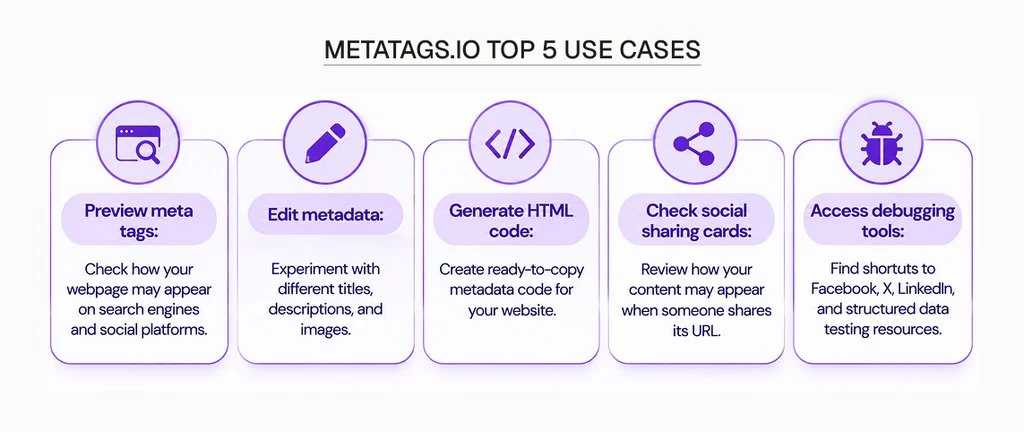
- Preview meta tags: Check how your webpage may appear on search engines and social platforms.
- Edit metadata: Experiment with different titles, descriptions, and images.
- Generate HTML code: Create ready-to-copy metadata code for your website.
- Check social sharing cards: Review how your content may appear when someone shares its URL.
- Access debugging tools: Find shortcuts to Facebook, X, LinkedIn, and structured data testing resources.
The platform recommends a 1200 × 628-pixel image for social sharing previews.
How Do You Use Metatags.Io?
You don't need to install software or complete a lengthy registration process.
- Visit MetaTags.io.
- Enter a webpage URL or provide your metadata.
- Add or change the page title and meta description.
- Upload your preferred sharing image.
- Check the different platform previews.
- Select Get Code to generate the HTML metadata.
- Copy the code and add it to your webpage's HTML head section.
One important point: generating the code doesn't automatically update your live website. You still need to implement the changes through your CMS or website code.
Is MetaTags.io Free? What Are Its Pricing Plans?
Metatags.io is free to use
The platform currently offers its main metadata editing, previewing, and code-generation functionality without a visible subscription requirement.
| Pricing detail | What we found |
| Free access | Available |
| Account registration | No sign-up requirement displayed |
| Monthly subscription | No paid plan verified |
| Annual subscription | No paid plan verified |
| Enterprise package | Not publicly verified |
Product Hunt also describes the platform as a metadata debugging and generation tool, rather than a subscription-based SEO suite.
| Our take: Its free access makes it attractive for occasional metadata checks. However, users looking for bulk processing, team management, or advanced SEO reporting should not assume these features are included. |
Why Should You Use MetaTags.io In 2027?
In 2027, website meta data is even more important. Google’s latest November 2026 update says content pages will not get as much visibility and rankings as service- or tool-based web pages.
That means you need to create even better meta tags so Google understands your content is helpful to the readers you're targeting.
Now the bigger question is: how can Metatags.io help users in 2027 to make their content/pages more effective?
Based on research, we found three reasons why Metatags.io is an option you should definitely try in 2027:
1. You Need Better UX For All Social Shares
In many cases, people open your content through a link shared by someone else.
So use appropriate meta tags, like a strong thumbnail image and alt text, a clear meta description, and a properly formatted title.
On Metatags.io, you can now check all these (the visitor’s version) through the “Preview” section.
2. Search Appearance Needs Attention
Google draws evidence and signals from multiple sources to rank search results and AI Overview snippets.
For example, suitable page titles and meta descriptions help readers nd search engines understand what the page is about, before they even click.
However, Google can change your title or pull a better section from your content to display as a meta description.
3. Metadata Checks Are Part Of A Better Publishing Workflow.
Many websites publish blogs daily. Many more upload new product pages and landing pages daily or on a regular schedule. For them, checking for missing tags or inconsistent information is critical.
Metatags.io makes this process easy through the “Preview” section. You don’t even need to subscribe to a dedicated tool to create and launch meta tags for SEO. So Metatags.io is also cost-effective.
MetaTags.io VS. 3 Alternatives: Which Tool Is Better?
MetaTags.io isn't the only tool that helps users preview social sharing cards. Three alternatives worth considering are Hey Meta, OpenGraph.xyz, and Social Share Preview.
1. Hey Meta
Offers social previews, metadata editing, code export, and additional AI crawler-readiness checks. A stronger option if you want to see how AI search engines can access your content.
Free · No account required
2. OpenGraph.xyz
A social sharing preview alternative for checking how Open Graph metadata appears across supported platforms. Consider it when your main requirement is checking social cards rather than running a broader SEO audit.
Current pricing and subscription details not independently verified
3. Social Share Preview
Helps users check how website links appear on Twitter/X, Facebook, LinkedIn, and Pinterest. A straightforward option for checking social sharing presentation.
Caution: Standalone subscription pricing not verified.
Quick Comparison Table
| Feature | MetaTags.io | Hey Meta | OpenGraph.xyz | Social Share Preview |
| Social previews | Yes | Yes | Yes | Yes |
| Metadata editing | Yes | Yes | Limited verification | Not verified |
| HTML code generation | Yes | Yes | Not verified | Not verified |
| Google preview | Yes | Yes | Not verified | Not verified |
| AI readiness checks | No verified feature | Yes | Not verified | No verified feature |
| Free access | Yes | Yes | Pricing unverified | Pricing unverified |
| No account required | Yes | Yes | Not verified | Not verified |
Which One Should You Choose?
- Metatags.io is an ideal option if you want to easily edit metadata or view previews across multiple platforms.
- If your primary goal is to appear on AI overviews, Hey Meta is a better alternative.
- If you are a social media manager and want to check page previews of your social posts, choose OpenGraph.xyz.
- If you want to check your social shares directly, the best tool to use is Social Share Preview.
What Are The Advantages And Disadvantages Of Metatags.io?
Pros
- Dont need to subscribe; 100% Free
- Clean UI that assists beginners
- Can check multiple social post previews from the same dashboard
- Can review and change reviews, pages, and images
- Can generate and copy HTML code directly
- Even technical users can benefit
Cons
- Doesn't replace a complete SEO audit platform.
- No verified bulk metadata editing or monitoring functionality.
- Preview results aren't a guarantee of how live social platforms will display a link.
What Could Metatags.Io Improve In 2027?
Metatags.io is simple and easy to use. However, there are still some drawbacks that users in 2027 should know about:
1. Add Bulk Metadata Checking
You have to check each URL one at a time. That can be challenging for publishers who have to manage hundreds of blog posts.
Therefore, makers should consider adding options like bulk URL uploading and metadata export. With these options, more agencies could use Metatags.io.
2. Introduce Clearer Validation And Error Reporting
The platform could go beyond displaying previews and flag common problems, such as missing Open Graph tags, incorrect image dimensions, inaccessible images, and missing descriptions.
3. Improve Its Support For Modern Publishing Workflows.
More direct CMS integrations, framework-specific code exports, and AI crawler-readiness checks could make MetaTags.io more relevant to modern marketing and development teams.
These are suggested improvements, not confirmed development plans.
What Could We Not Verify About Metatags.Io?
A transparent review should also identify information that isn't publicly established.
- Detailed pricing roadmap: We couldn't verify whether the developer plans to introduce paid subscriptions or premium features.
- Bulk processing capabilities: We couldn't establish whether the platform supports bulk metadata management behind any account or paid access.
- Independent performance testing: We couldn't verify how closely every preview matches the actual rendering on each social platform under different conditions.
Treat these points as unverified rather than confirmed product limitations.
Is MetaTags.io Suitable For Beginners?
Yes. Its straightforward editing interface and lack of a visible registration requirement make it accessible to beginners.
You don't need to understand HTML to experiment with titles, descriptions, and images. However, you will need basic website editing access to implement the generated code.
It is also useful for experienced marketers who want a quick metadata preview without opening a larger SEO platform.
Final Verdict: Is MetaTags.io Worth Using In 2027?
In 2027, if you need a simple, free option to create, edit, and preview website metadata, Metatags.io is the best choice.
It has a fluid interface, and its features and uses are clear and easy to understand. So if you plan to experiment with your meta titles, images, and meta descriptions, you can use Metatags.io.
Here, you can check multiple previews at once and even generate HTML code without a subscription.
However, users say Metatags.io is not a complete solution for SEO professionals. You cannot use it for keyword research, rank tracking and monitoring, or technical audits.
Instead, bloggers, developers, and independent creators should consider Metatags.io a strong option. Even most small marketing teams can use Metatags.io.
Larger teams may face major issues with MetaTags because bulk processing and validation can be difficult.
My Opinion: If you are using a few free SEO tools, Metatags.io should be one of them. It's best used to check previews and improve how webpages look before they launch.